What a layer can be
The stack can hold pixel layers, groups, clipping masks, pixel and vector masks, fill layers (solid, gradient and pattern), adjustment layers and live smart objects. Groups nest. A pass-through group composites its children as if they were not inside a group. You also get opacity, fill, locks and colour labels.
- 27 Photoshop blend modes, plus six Paint.NET modes that stay off the menu unless the layer already uses one.
- Align, distribute and link across a multi-layer selection.
- Merge, flatten, rasterize, Layer via Copy and Layer via Cut.
Arrange the stack
- Duplicate before you experiment. The project says shortcuts sit where a Photoshop user expects them, and it names ⌘J among those keys. Layer via Copy and Layer via Cut are in the Layer menu when you would rather not trust a key.
- Group what moves together. Put related layers in a group. Groups can contain groups. Use a pass-through group when the group's own blend mode should not isolate the children.
- Set opacity and the blend mode. Opacity and fill are separate. Start with Normal, then change the blend mode only for the layer that should mix with what is under it.
Clipping, masks and styles
A clipping mask limits a layer to the opaque pixels of the layer under it. A layer mask is different: black hides, white shows, and the pixels stay put. Turning a selection into a mask is its own lesson.
Layer styles
Drop Shadow, Inner Shadow, Outer and Inner Glow, Bevel & Emboss, Satin, Stroke, and Color, Gradient and Pattern Overlay can sit on a layer, including type. They stay live. You can copy and paste styles between layers, or hide every effect at once.
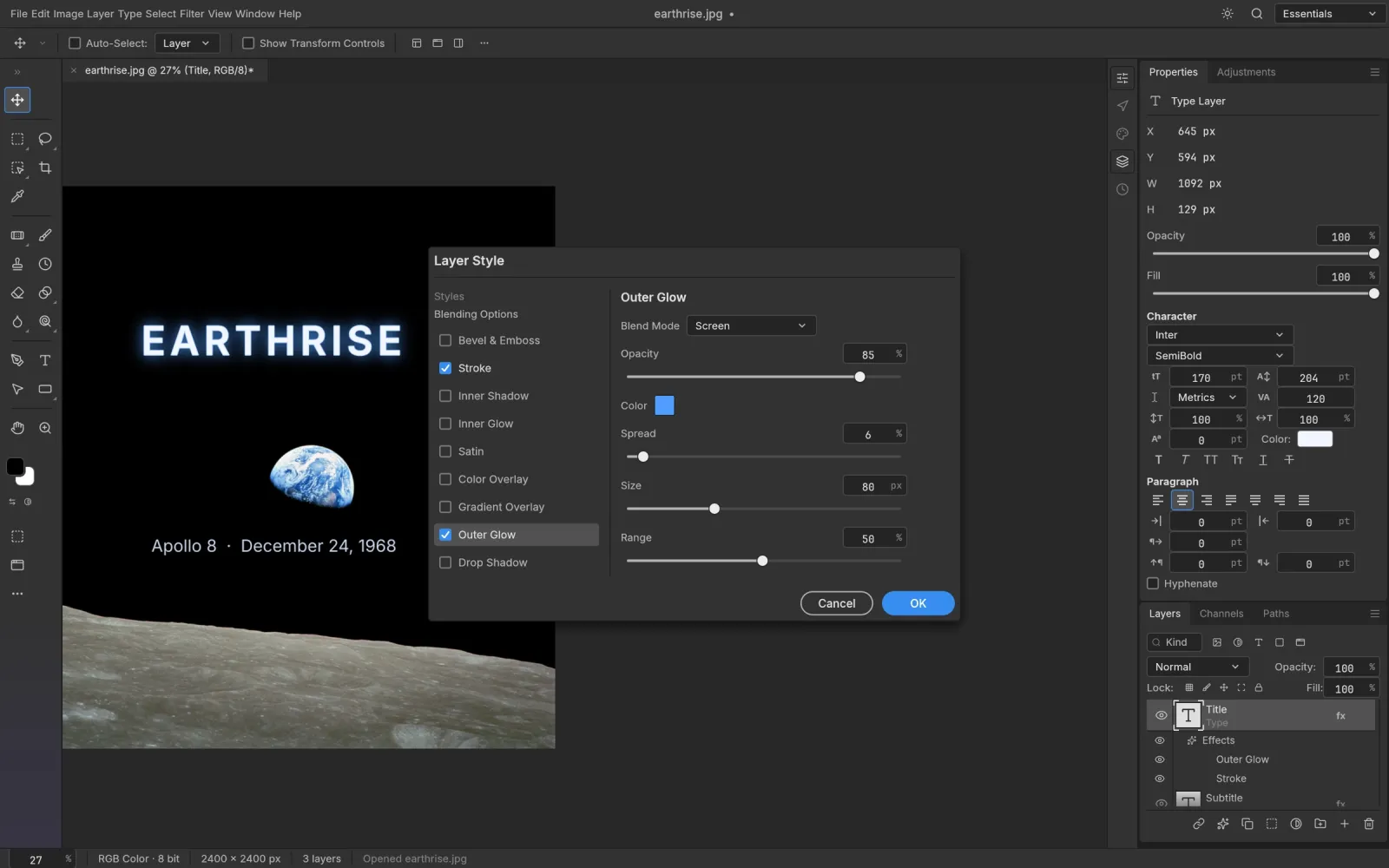
Screenshot from the PhotoCraft repository (docs/images). Artwork in the screenshot is public domain.
Frequently asked questions
Does PhotoCraft have Photoshop blend modes?
Yes. The project lists Photoshop's 27 blend modes. Six further modes exist so Paint.NET files can keep their blending; other layers do not show them.
Can I group layers?
Yes. Groups nest, and a pass-through group composites its children as if they were not grouped.
What is the difference between a clipping mask and a layer mask?
Clipping uses the opaque pixels of the layer underneath. A layer mask is its own image: paint it to hide or show, and the layer's pixels stay.